
Computing & E-Safety
We follow a broad and balanced Computing curriculum that builds on previous learning and provides both support and challenge for learners. We follow a Computing scheme that ensures progression of skills and covers all aspects of the Computing curriculum. All classes will have scheduled Computing sessions each term, alongside using technology creatively through other curriculum subjects. Children’s work will be stored on J2E for most children and use paper folders for reference and assessment. We want to ensure that Computing is embedded in our whole school curriculum and that opportunities for enhancing learning by using technology are always taken.
How do we teach Computing at All Saints?
At All Saints Church School, we teach computing through the scheme Kapow. Drawing from knowledge carefully sequenced for progression, all children should master Computing to such an extent that all will be able to make use of Computing effectively in their everyday lives. Part of this learning involves supporting children to use technology as an aid, without being completely reliant on it for all they do. We have high aspirations for our pupils and intend for them to develop the skills to move into a career in this field should they wish to. Our children will be taught to use technology responsibly and carefully, being mindful of how their behaviour, words and actions can affect others. Our children will be taught Computing in a way that ensures progression of skills and follows a clear sequence to build on previous learning. Our children will gain experience and skills of a wide range of technology in a way that will enhance their learning opportunities, enabling them to creatively use technology across a range of subjects and solve problems, ensuring they make links to strengthen their progress.
Teachers build on pupils’ prior knowledge, break learning into manageable steps and adapt teaching to meet the needs of all learners. We use questioning, discussion, retrieval practice and knowledge organisers to support long-term memory and understanding. Pupils use a mixed approach.
Our children enjoy and value Computing and know why they are doing things, not just how. Children will understand and appreciate the value of Computing in the context of their personal wellbeing and the technological, creative, and cultural industries and their many career opportunities. Progress in Computing is demonstrated through regularly reviewing and scrutinising children’s work, in accordance with our assessment policy to ensure that progression of skills is taking place.
Some examples of how we gather evidence of children’s learning include…
• looking at pupils’ work, especially over time as they gain skills and knowledge
• observing how they perform in lessons
• gathering of pupil voice regarding what they know and do
The Computing curriculum contributes to children’s personal development in creativity, independence, judgement, and self-reflection. This would be seen in them being able to talk confidently about their work and sharing their work with others.
EYFS
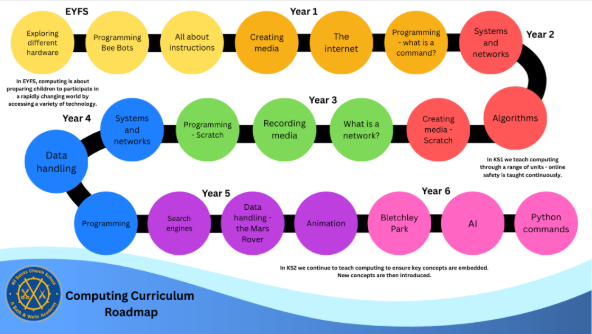
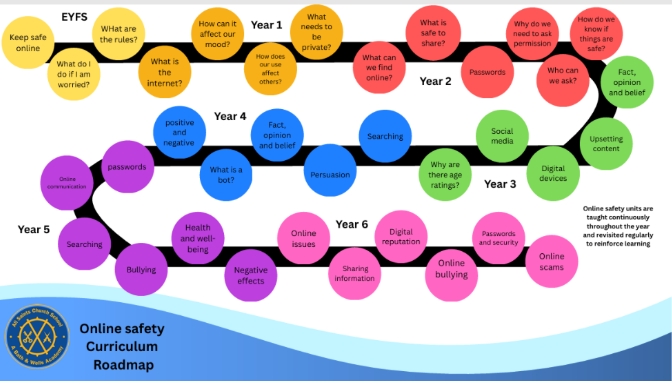
In the Early Years Foundation Stage, children will begin exploring how they use technology in their daily lives, and to begin their learning around online safety in a meaningful, age-appropriate way.
Our roadmaps show how the skills and knowledge of computing and online safety progress through the school.
Important documents:
childline-poster-primary-schools-english

Gaming information for parents:
We know how popular gaming is for children. There are many fantastic games they can be using by themselves, with you or with their friends. There are two new resources that have been published to support you to help children have a positive and enjoyable time sharing games.
Childnet provides a set of resources on their Gaming resources page, including a shopping checklist for purchasing games which may be useful if you are considering purchasing games or devices as presents: https://www.saferinternet.org.uk/blog/gaming-%E2%80%93-resources-parents-and-carers
The NSPCC suggest 5 ways to help children play safe:
- Check the game’s content: Always check age ratings and play the game yourself to know what they will be doing.
- Know how to mute, block and report: Check how to do this in the different games your children use.
- Be Share Aware: Remind children not to move from chats in games to chats on social networks.
- Activate safety settings: Turn on parental controls and privacy settings on gaming consoles, turn off in-app purchases.
- Keep the conversation going: Have regular conversations about the games your children play and take opportunities to play games with your children.
Websites for e-safety information and activities:
- Sharenting- Kids Milestone Moments
- Online Gaming Tips poster
- IM Screen Time
- Internet Matters Screen Time Guide
Follow eLiM on Twitter at: Somerset_eLIM
Safer Internet Gaming

Hector's World
Cyber Cafe
Kidsmart KS1
CBBC
Jesus says, “All things are possible if you believe.” Mark 9:23